Reading telemetry with pymavlink
DRT 114 Computer Programming
Lesson
By the end of this module you will be able to
- Explain the MAVLink 2 frame structure and read a header from raw bytes
- Read a telemetry file (.tlog) with pymavlink and count each message type
- Convert the units of HEARTBEAT, GLOBAL_POSITION_INT, SYS_STATUS and VFR_HUD correctly
- Find link outages from heartbeats and calculate packet loss from sequence numbers
- Export data to CSV and connect to SITL live safely
Why this matters
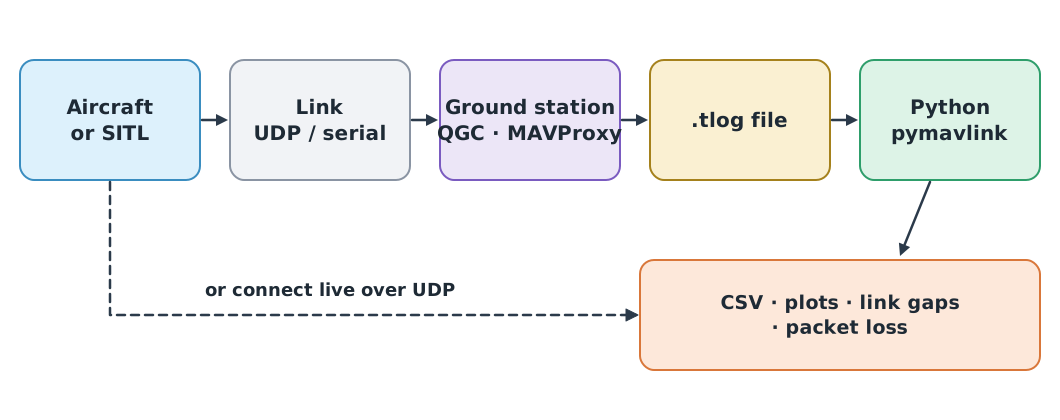
Drones running PX4 or ArduPilot report their state to the ground station over the MAVLink protocol, and most ground stations record every message they receive in a .tlog file. When something goes wrong, that file is the evidence of what the drone reported, when, and when the link dropped (DRT 342 module 4). Someone who can read it with a program analyses incidents faster and more precisely than by scrolling graphs in a packaged tool.
This module uses telemetry_sample.tlog, synthetic data from the same flight model as module 3, with a deliberate 8-second link outage.
The MAVLink 2 frame
Every MAVLink 2 message starts with the byte 0xFD (MAVLink 1 uses 0xFE), followed by a header giving the length, sequence number, sender and message ID, then the payload and a checksum.
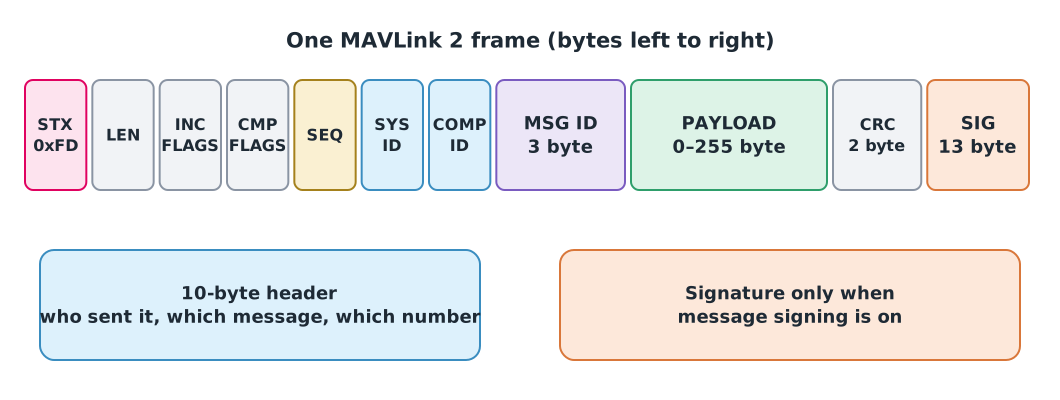
A .tlog stores each message after an 8-byte receive time (microseconds since 1970, big-endian). Reading the raw bytes once shows what the library does for us.
import struct
from datetime import datetime, timezone

with open("telemetry_sample.tlog", "rb") as f:
    raw = f.read(20)

ts_us = struct.unpack(">Q", raw[:8])[0]
print(datetime.fromtimestamp(ts_us / 1e6, tz=timezone.utc).isoformat())
print(" ".join(f"{b:02X}" for b in raw[8:20]))

stx, length, incompat, compat, seq, sysid, compid = raw[8:15]
msgid = int.from_bytes(raw[15:18], "little")
print(f"stx=0x{stx:02X} len={length} seq={seq} sysid={sysid} compid={compid} msgid={msgid}")
2026-03-14T02:30:00+00:00
FD 09 00 00 00 01 01 00 00 00 04 00
stx=0xFD len=9 seq=0 sysid=1 compid=1 msgid=0Message ID 0 is HEARTBEAT, and the payload is 9 bytes because MAVLink 2 trims trailing zero bytes from the payload before sending.
Reading the file with pymavlink
pymavlink splits bytes into messages. mavutil.mavlink_connection() opens both files and live connections.
Watch out: blocking with files
When reading a file, use recv_match(blocking=False) and stop when it returns None. With blocking=True the program waits forever for a new message at the end of the file. blocking=True suits live connections where messages keep arriving, and should be given a timeout.
from collections import Counter
from pymavlink import mavutil


def read_all(path, msg_type=None):
    """Yield every message (optionally of one type) from a .tlog file."""
    link = mavutil.mavlink_connection(path)
    while True:
        msg = link.recv_match(type=msg_type, blocking=False)
        if msg is None:
            return
        yield msg


counts = Counter(msg.get_type() for msg in read_all("telemetry_sample.tlog"))
print(counts.most_common())
[('ATTITUDE', 3955), ('GLOBAL_POSITION_INT', 1582), ('VFR_HUD', 1582), ('HEARTBEAT', 396), ('SYS_STATUS', 396)]Because read_all() uses yield, it is a generator: it hands out messages one at a time without holding the whole file in memory, which suits large logs.
Units of key messages
MAVLink stores numbers as integers in units that differ from everyday ones. Always convert, following the common message set documentation.
| Message | Field | Stored unit | Convert to |
|---|---|---|---|
| HEARTBEAT (#0) | type, autopilot, base_mode, custom_mode | Enum codes and bits | Vehicle type, autopilot, armed state, flight mode |
| SYS_STATUS (#1) | voltage_battery | mV | ÷ 1000 → V |
current_battery | cA | ÷ 100 → A | |
battery_remaining | % | −1 means unknown | |
| ATTITUDE (#30) | roll, pitch, yaw | rad | × 180/π → degrees |
| GLOBAL_POSITION_INT (#33) | lat, lon | degE7 | ÷ 10⁷ → degrees |
alt, relative_alt | mm | ÷ 1000 → m | |
vx, vy, vz | cm/s | ÷ 100 → m/s | |
hdg | cdeg | ÷ 100 → degrees | |
| VFR_HUD (#74) | groundspeed, alt, climb | m/s, m, m/s | Use as is |
Example 1 Decoding a heartbeat and a position
hb = next(read_all("telemetry_sample.tlog", "HEARTBEAT"))
print("quadrotor:", hb.type == mavutil.mavlink.MAV_TYPE_QUADROTOR)
print("ArduPilot:", hb.autopilot == mavutil.mavlink.MAV_AUTOPILOT_ARDUPILOTMEGA)
print("mode:", mavutil.mode_string_v10(hb))
print("armed:", bool(hb.base_mode & mavutil.mavlink.MAV_MODE_FLAG_SAFETY_ARMED))

pos = next(m for m in read_all("telemetry_sample.tlog", "GLOBAL_POSITION_INT") if m.relative_alt > 29_000)
print(f"lat {pos.lat / 1e7:.6f}, lon {pos.lon / 1e7:.6f}")
print(f"height above home {pos.relative_alt / 1000:.1f} m, heading {pos.hdg / 100:.0f} deg")
print(f"climb rate {-pos.vz / 100:.1f} m/s")
quadrotor: True
ArduPilot: True
mode: GUIDED
armed: False
lat 14.099999, lon 100.599999
height above home 29.5 m, heading 90 deg
climb rate 2.5 m/sIn the NED frame vz is positive downwards, so flip its sign to get the climb rate (review frames in DRT 344 module 5). The armed state is one bit of base_mode, extracted with the & operator.
Finding link outages and packet loss
Every message has a sequence number from 0 to 255 that wraps around. A jump means packets were sent but not received. Heartbeats are typically sent about once per second on radio links (MAVLink says the rate depends on the channel and is not fixed by the protocol), so an unusually long gap between heartbeats reveals a link outage.
Example 2 Analysing link quality
t0 = prev_t = prev_seq = None
gaps, modes = [], []
received = lost = 0

for msg in read_all("telemetry_sample.tlog"):
    received += 1
    seq = msg.get_seq()
    if prev_seq is not None:
        lost += (seq - prev_seq - 1) % 256
    prev_seq = seq

    if msg.get_type() == "HEARTBEAT":
        t = msg._timestamp
        t0 = t if t0 is None else t0
        if prev_t is not None and t - prev_t > 3:
            gaps.append((round(prev_t - t0, 1), round(t - prev_t, 1)))
        prev_t = t
        mode = mavutil.mode_string_v10(msg)
        if not modes or modes[-1][1] != mode:
            modes.append((round(t - t0, 1), mode))

print("heartbeat gaps (start s, length s):", gaps)
print(f"lost {lost} of {received + lost} packets ({100 * lost / (received + lost):.2f}%)")
print("mode changes:", modes)
heartbeat gaps (start s, length s): [(149.0, 9.0)]
lost 160 of 8071 packets (1.98%)
mode changes: [(0.0, 'GUIDED'), (22.0, 'AUTO'), (352.0, 'RTL'), (387.0, 'LAND')]There is a 9-second heartbeat gap after second 149, matching the model’s 8-second outage (heartbeats come every second, so the observed gap can be up to a second longer than the real outage), and the sequence numbers show 160 lost packets. Using % 256 counts correctly even when the sequence wraps from 255 to 0.
Exporting to CSV
import pandas as pd

rows = [
    {
        "time_s": m.time_boot_ms / 1000,
        "lat_deg": m.lat / 1e7,
        "lon_deg": m.lon / 1e7,
        "rel_alt_m": m.relative_alt / 1000,
    }
    for m in read_all("telemetry_sample.tlog", "GLOBAL_POSITION_INT")
]
position = pd.DataFrame(rows)
position.to_csv("position_from_tlog.csv", index=False)
print(position.shape, "max height", position["rel_alt_m"].max(), "m")
(1582, 4) max height 30.0 mThe file feeds straight into the module 3 tools. time_boot_ms counts from when the autopilot booted, not wall-clock time; for wall-clock time use _timestamp, recorded by the ground station.
Connecting to SITL live
When ready, connect to SITL (DRT 342 module 2). The same code works; only the source changes. ArduPilot SITL through MAVProxy outputs on UDP port 14550, and PX4 SITL sends to ground stations on UDP 14550 and to offboard programs on UDP 14540.
from pymavlink import mavutil

link = mavutil.mavlink_connection("udp:127.0.0.1:14550")
link.wait_heartbeat(timeout=10)
print("connected to system", link.target_system)

for _ in range(20):
    att = link.recv_match(type="ATTITUDE", blocking=True, timeout=2)
    if att is not None:
        print(f"roll {att.roll:.3f} rad, pitch {att.pitch:.3f} rad")
Safety
This lesson only reads telemetry. Sending commands to a drone through pymavlink must always be tried in SITL first, and a real aircraft’s MAVLink port must never be exposed to the internet, where anyone could send it commands.
Module lab
Lab: a link-quality report from a tlog
Follow lab guide L09 “Reading MAVLink telemetry from SITL” in the drone knowledge hub.
- Read
telemetry_sample.tlog, count each message type, and calculate each type’s messages per second. - Find link outages and packet loss, and report when the flight mode changes.
- Export position, battery voltage (from SYS_STATUS) and speed (from VFR_HUD) to CSV, and compare with module 3’s
flight_log_sample.csv. - If a computer can run SITL, connect live, fly a short mission, record a tlog and run the same program on it.
Common mistakes
Watch out
- Using
blocking=Trueon a file, so the program hangs at the end - Forgetting unit conversion, such as plotting degE7
latdirectly or readingrelative_altas metres - Forgetting to flip
vzin the NED frame - Counting packet loss without handling sequence wrap-around
- Assuming heartbeats must arrive every second by standard, when that is only the usual practice on radio links
- Exposing a MAVLink port to outside networks
Summary
- A MAVLink 2 frame starts with
0xFD, and its header gives the length, sequence, sender and message ID mavutil.mavlink_connection()opens both .tlog files and live links; read files withblocking=False- Always convert units: degE7 → degrees, mm → m, cm/s → m/s, cdeg → degrees
- Heartbeat gaps reveal link outages, and sequence jumps count lost packets
- Export to CSV for pandas analysis, and test with SITL before working with a real aircraft
Check your understanding
- What is the first byte of a MAVLink 2 frame, and of MAVLink 1?
- What latitude in degrees is
lat = 140999986in GLOBAL_POSITION_INT? - How many volts is
voltage_battery = 24310in SYS_STATUS? - The previous sequence number was 250 and the next message received has 3. How many packets were lost?
- Why does reading a .tlog with
recv_match(blocking=True)hang?
Answers
- MAVLink 2 is
0xFD; MAVLink 1 is0xFE - degrees
- V
- packets
- At the end of the file it waits for a new message that will never come; use
blocking=Falseand stop onNone
Key formulas
| MAVLink coordinate units | |
| Packet loss from sequence numbers |
Key references
- MAVLink Development Team. Packet serialization. MAVLink developer guide. link
- MAVLink Development Team. MAVLink common message set (common.xml). link
- ArduPilot and MAVLink contributors. (2026). pymavlink (Version 2.4.50) [Computer software]. PyPI. link
- ArduPilot Dev Team. SITL simulator (software in the loop). link
- PX4 Autopilot. PX4 user and developer guide. link
- MAVLink Development Team. MAVLink developer guide. link
Further reading
Study the assigned knowledge units in advance, review media and take the module quiz
In class / field
Lab or field practice from worksheets with a safety checklist
Learning evidence: Checked worksheets and quiz results