Block programming and Git for teamwork
DRT 114 Computer Programming
Lesson
By the end of this module you will be able to
- Translate a Hula drone block program into Python with the same structure
- Write a drone simulation class and use it to compute polygon and star routes
- Explain concurrency with threads, signalling, and protecting shared variables
- Use Git to record history, branch and merge following GitHub flow
- Write commit messages following Conventional Commits and keep secrets out of repositories
Why this matters
Many students start programming drones with block programs, such as HighGreat’s Hula app, dragging blocks like “take off”, “fly forward” and “turn” together. Block programs make program structure very visible, but as work grows you need a language that can be tested, reused and shared by a team: Python with Git.
The good news is that the ideas are almost identical. One block is one line of code, a Repeat block is for, an if block is if. What you gain are testing tools, simulation, and a traceable history of changes.
From blocks to Python
| Hula block | Python | Note |
|---|---|---|
| when ▶ clicked | Main part of the program | Start point |
| Take off / Landing | drone.take_off() / drone.land() | Always take off first and land last |
| Fly to Front with 60 cm | drone.fly_forward(60) | |
| Turn to Clockwise with 90 degree | drone.turn_clockwise(90) | |
| Repeat 4 times | for _ in range(4): | |
| repeat until [condition] | while not condition: | |
| Set / change [variable] | count = 0 / count += 1 | |
| broadcast / when I receive | threading.Event | Concurrency |
The class below models a drone on a flat plane. It does not command a real drone, but it checks a program’s logic before flight. Hula’s speed is a percentage command, not m/s, so the class does not model flight time.
import math


class SimDrone:
    """A flat-plane drone model for checking block programs before flight."""

    def __init__(self):
        self.x_cm = 0.0
        self.y_cm = 0.0
        self.heading_deg = 0.0
        self.flying = False
        self.distance_cm = 0.0
        self.turned_deg = 0.0

    def take_off(self):
        self.flying = True

    def land(self):
        self.flying = False

    def _require_flying(self):
        if not self.flying:
            raise RuntimeError("take off first")

    def fly_forward(self, cm):
        self._require_flying()
        self.x_cm += cm * math.sin(math.radians(self.heading_deg))
        self.y_cm += cm * math.cos(math.radians(self.heading_deg))
        self.distance_cm += cm

    def turn_clockwise(self, deg):
        self._require_flying()
        self.heading_deg = (self.heading_deg + deg) % 360
        self.turned_deg += deg

    def back_at_start(self):
        return math.isclose(self.x_cm, 0, abs_tol=1e-6) and math.isclose(self.y_cm, 0, abs_tol=1e-6)


drone = SimDrone()
try:
    drone.fly_forward(100)
except RuntimeError as err:
    print("error:", err)
error: take off firstThe _require_flying() method enforces Hula’s “take off first” rule in code. Forget the Take off block and the simulation reports it immediately, instead of the problem surfacing in flight.
Polygons and stars
Example 1 A square and a five-pointed star (Hula examples 2 and 3)
Flying equal straight legs and turning the same way each time, the turn for a figure with vertices stepping vertices at a time is . A square is with 90° turns; a five-pointed star is with 144° turns.
def fly_polygon(n, k, side_cm):
    drone = SimDrone()
    drone.take_off()
    for _ in range(n):
        drone.fly_forward(side_cm)
        drone.turn_clockwise(360 * k / n)
    drone.land()
    return drone


for n, k, side in [(4, 1, 60), (5, 2, 50)]:
    d = fly_polygon(n, k, side)
    print(f"{{{n}/{k}}}: turn {360 * k / n:.0f} deg, flown {d.distance_cm:.0f} cm, "
          f"turned {d.turned_deg:.0f} deg, back at start: {d.back_at_start()}")
{4/1}: turn 90 deg, flown 240 cm, turned 360 deg, back at start: True
{5/2}: turn 144 deg, flown 250 cm, turned 720 deg, back at start: TrueThe star turns 720° in total, not 360°, because the path crosses itself.
Example 2 When a star closes sooner than expected
With , meant as a six-pointed star, the drone returns to the start after only legs, tracing a triangle and then repeating it.
def legs_until_back(n, k, side_cm=100):
    drone = SimDrone()
    drone.take_off()
    for leg in range(1, n + 1):
        drone.fly_forward(side_cm)
        drone.turn_clockwise(360 * k / n)
        if drone.back_at_start():
            return leg
    return None


for n, k in [(5, 2), (6, 2), (7, 3)]:
    print(f"{{{n}/{k}}}: back after {legs_until_back(n, k)} legs, n / gcd = {n // math.gcd(n, k)}")
{5/2}: back after 5 legs, n / gcd = 5
{6/2}: back after 3 legs, n / gcd = 3
{7/3}: back after 7 legs, n / gcd = 7The simulation confirms the formula. That is the value of simulating before flight: conceptual mistakes show up without spending time or risking equipment.
Concurrency
Hula’s level-5 example uses two scripts running at once: one flies a survey, the other searches for QR targets, communicating through a broadcast block and a shared variable. In Python this becomes two threads: threading.Event replaces the broadcast, and threading.Lock stops both threads changing the shared variable at the same moment and corrupting it.
import threading

mission_started = threading.Event()
lock = threading.Lock()
targets_marked = 0
QR_FOUND_AT_SCAN = {2, 5, 6}


def search_thread():
    global targets_marked
    mission_started.wait()
    scan = 0
    while targets_marked < 3:
        scan += 1
        if scan in QR_FOUND_AT_SCAN:
            with lock:
                targets_marked += 1
        threading.Event().wait(0.002)


searcher = threading.Thread(target=search_thread)
searcher.start()
mission_started.set()
while targets_marked < 3:
    threading.Event().wait(0.002)
searcher.join()
print("targets marked:", targets_marked)
targets marked: 3searcher.join() waits for the search thread to finish before landing, like Hula’s stop all scripts block, which prevents a script from being left running. Concurrent code is easy to get wrong; if you do not need it, write a single sequence first.
Git: recording history
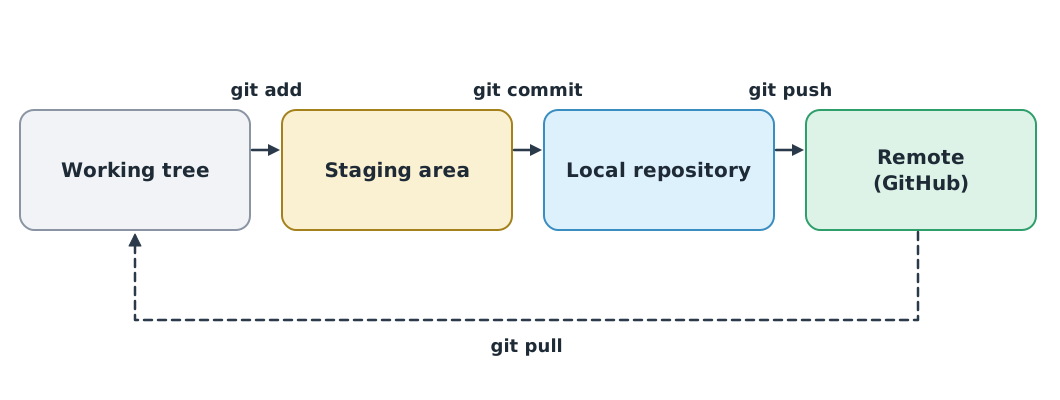
Git records snapshots of code (commits) with explanatory messages, lets you go back, and lets many people work on the same code. The Pro Git book is free at git-scm.com.
git config --global init.defaultBranch main   # Git still names the default branch master
git init
git add mission_tools.py test_mission_tools.py
git commit -m "feat: add battery_status and distance_m"
git log --oneline
A .gitignore file tells Git which files not to track. Add it in the very first commit.
.venv/
__pycache__/
*.tlog
.env
Never commit secrets
Passwords, API keys and .env files must never be committed. Git history keeps every version; deleting later does not remove it from history or from forks others have already copied. GitHub advises that if a secret leaks, revoke or rotate it first, then clean the history. OWASP recommends keeping secrets in a secrets manager or environment variables, never embedded in code.
GitHub flow and commit messages
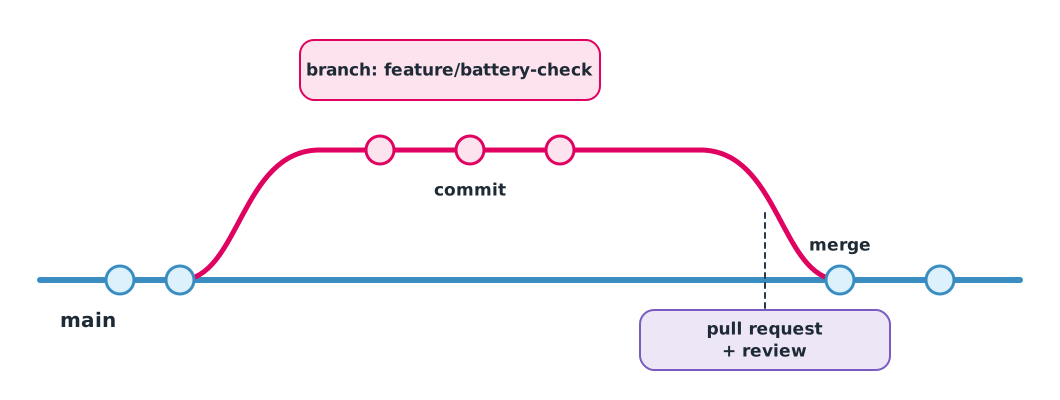
GitHub flow is simple: branch from main → change and commit → open a pull request → a teammate reviews → merge and delete the branch.
git switch -c feature/battery-check
# edit the code and make the tests pass
git add mission_tools.py test_mission_tools.py
git commit -m "fix: treat 15% as LOW, not OK"
git push -u origin feature/battery-check
Conventional Commits 1.0.0 uses the form type(scope): description, such as feat: for a new capability, fix: for a bug fix, and docs:, test: or refactor: for other work. A good message says what changed, not “fixed stuff” or “update”.
Module lab
Lab: a team mini-project
Use the Hula block reference and the five-level examples in the drone knowledge hub.
- Choose one Hula example from levels 2–4, translate it to Python with
SimDrone, and write tests confirming the route closes or turns fully as intended. - Create a group repository on GitHub, add
.gitignorein the first commit, and bring in your files from modules 2 to 4. - Each member works on their own branch, opens a pull request, and reviews at least one teammate’s work.
- If a Hula drone is available, fly the original block program in a safe area under the instructor’s supervision and compare it with the simulation.
Common mistakes
Watch out
- Forgetting Take off or Landing in a block program
- Treating the app’s speed percentage as m/s without calibration
- Letting two threads change one variable without a Lock
- Committing the
.venvfolder or secrets - Working directly on main, so teammates’ work collides
- Writing “update” as a commit message, which says nothing
Summary
- Hula blocks translate directly to Python: Repeat is
for, repeat until iswhile, broadcast isthreading.Event - A drone simulation class checks logic before flight; a figure turns and closes after legs
- Threads sharing a variable need a Lock, and must be waited for with
join() - Git has four areas, and GitHub flow is branch → commit → pull request → review → merge
- Write commit messages following Conventional Commits, and never commit secrets
Check your understanding
- Which Python statement matches the block Repeat 5 times?
- For a regular hexagon with 100 cm sides, how many degrees is each turn, and how far is the total flight?
- After how many legs does return to its start?
- Which Git command moves changes from the working tree to the staging area?
- You accidentally committed an API key to GitHub. What must you do first?
Answers
for _ in range(5):- per turn, and cm in total
- legs
git add- Revoke or rotate the key immediately, because deleting it from history later cannot guarantee nobody has copied it
Key formulas
| Turn angle of polygons and stars {n/k} | |
| Legs before returning to start |
Key references
- Shenzhen HighGreat Innovation Technology Development Co. HULA all-in-1 drone and Hula app user manual. link
- Python Software Foundation. The Python tutorial (Python 3.14 documentation). link
- Chacon, S., & Straub, B. (2014). Pro Git (2nd ed.). Apress. link
- GitHub. GitHub flow. GitHub Docs. link
- Conventional Commits. Conventional Commits 1.0.0. link
- GitHub. Removing sensitive data from a repository. GitHub Docs. link
- OWASP Foundation. Secrets management cheat sheet. OWASP Cheat Sheet Series. link
Further reading
Study the assigned knowledge units in advance, review media and take the module quiz
Hula block command reference
Hula drone programming examples in five levels
Git and version-controlled collaboration
In class / field
Lab or field practice from worksheets with a safety checklist
Learning evidence: Checked worksheets and quiz results