Control structures and functions
DRT 114 Computer Programming
Lesson
By the end of this module you will be able to
- Write if/elif/else decisions and loops with for and while
- Use lists, tuples and dicts to hold mission data
- Write functions with docstrings, default values and return values
- Handle errors appropriately with exceptions
- Test functions with assert and pytest
Why this matters
Useful programs must decide, for example warning when the battery is low, and repeat, for example computing every leg of a route. As code grows, it must be split into functions with clear jobs that can be tested separately and reused. The autopilots that fly real aircraft are built from the same elements, only on a much larger scale.
Deciding with if
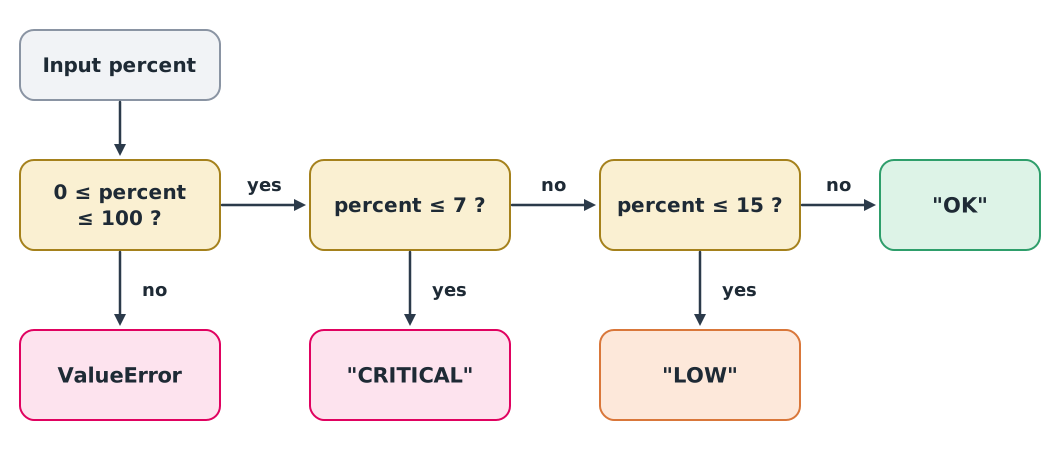
This example grades a battery against PX4’s default thresholds in the version checked (low 15%, critical 7%), covered in DRT 342 module 2.
def battery_status(percent):
    """Return "OK", "LOW" or "CRITICAL" for a battery percentage (0-100)."""
    if not 0 <= percent <= 100:
        raise ValueError("percent must be between 0 and 100")
    if percent <= 7:
        return "CRITICAL"
    if percent <= 15:
        return "LOW"
    return "OK"


for level in [100, 16, 15, 8, 7, 0]:
    print(level, battery_status(level))
100 OK
16 OK
15 LOW
8 LOW
7 CRITICAL
0 CRITICALOrder matters. <= 7 must be checked before <= 15; swap them and 5% returns “LOW” instead of “CRITICAL”. Values exactly on a boundary, such as 15 and 7, must always be tested.
Handling errors
Given an impossible value such as 120%, a function should not guess. It should raise an exception so the caller knows, and the caller chooses how to handle it with try/except.
readings = [45, 120, 12]
for reading in readings:
    try:
        print(reading, battery_status(reading))
    except ValueError as err:
        print(reading, "rejected:", err)
45 OK
120 rejected: percent must be between 0 and 100
12 LOWCatching everything with a bare except: and doing nothing is a dangerous habit, because it hides the real problem. Always name the error type you expect.
Loops and data structures
A list holds an ordered, changeable sequence; a tuple holds data that should not change, such as one coordinate; a dict holds name–value pairs.
Example 1 Route length and flight time
A 200 × 100 m rectangular route in local coordinates (metres east, north), flown at 8 m/s.
import math

waypoints = [(0, 0), (200, 0), (200, 100), (0, 100), (0, 0)]
drone = {"id": "RSU-QUAD-01", "cruise_ms": 8.0}

total_m = 0.0
for start, end in zip(waypoints, waypoints[1:]):
    leg = math.dist(start, end)
    total_m += leg
    print(f"{start} -> {end}: {leg:.0f} m")

minutes, seconds = divmod(total_m / drone["cruise_ms"], 60)
print(f"total {total_m:.0f} m, {minutes:.0f} min {seconds:.0f} s")
(0, 0) -> (200, 0): 200 m
(200, 0) -> (200, 100): 100 m
(200, 100) -> (0, 100): 200 m
(0, 100) -> (0, 0): 100 m
total 600 m, 1 min 15 szip(waypoints, waypoints[1:]) pairs neighbouring points, a pattern used constantly with routes and time series.
Reusable functions
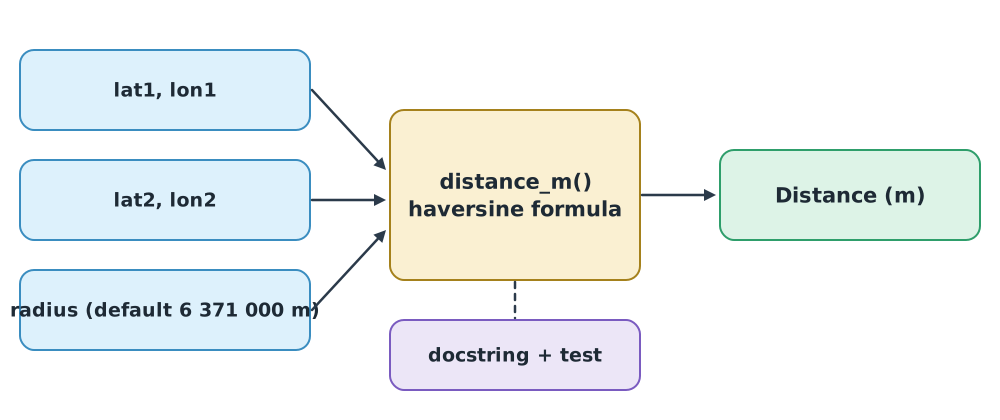
A good function does one job, has a name that says what it does, has a docstring describing what it takes and returns (PEP 257), and does not quietly change outside values.
Example 2 Is the site inside VTR1?
Using DRT 343 module 2: VTR1 is a circle of 10 NM radius around 13°45′54″N 100°32′18″E, and the site is at 13°50′00″N 100°40′00″E.
EARTH_RADIUS_M = 6_371_000.0
NM_TO_M = 1852


def distance_m(lat1, lon1, lat2, lon2, radius=EARTH_RADIUS_M):
    """Great-circle distance in metres between two points given in degrees."""
    phi1, phi2 = math.radians(lat1), math.radians(lat2)
    d_phi = phi2 - phi1
    d_lambda = math.radians(lon2 - lon1)
    a = math.sin(d_phi / 2) ** 2 + math.cos(phi1) * math.cos(phi2) * math.sin(d_lambda / 2) ** 2
    return 2 * radius * math.asin(math.sqrt(a))


def dms_to_deg(degrees, minutes, seconds):
    """Convert degrees, minutes and seconds to decimal degrees."""
    return degrees + minutes / 60 + seconds / 3600


vtr1_centre = (dms_to_deg(13, 45, 54), dms_to_deg(100, 32, 18))
site = (dms_to_deg(13, 50, 0), dms_to_deg(100, 40, 0))

d = distance_m(*vtr1_centre, *site)
print(f"{d / 1000:.1f} km, inside VTR1: {d <= 10 * NM_TO_M}")
15.8 km, inside VTR1: TrueThis matches the result in DRT 343. The * before a tuple unpacks it into separate arguments, and underscores in 6_371_000.0 make the digits easier to read.
Testing functions
assert checks that a condition is true; if not, the program stops and reports it immediately. Use it with known answers, including boundary values and impossible inputs.
assert battery_status(16) == "OK"
assert battery_status(15) == "LOW"
assert battery_status(7) == "CRITICAL"
assert math.isclose(distance_m(0, 0, 0, 1), 111_194.9, abs_tol=0.1)

try:
    battery_status(-1)
except ValueError:
    print("all tests passed")
all tests passedAs a project grows, move tests into test_*.py files and run them with pytest, which requirements.txt already installs.
# test_battery.py
import pytest
from mission_tools import battery_status

def test_boundaries():
    assert battery_status(15) == "LOW"
    assert battery_status(7) == "CRITICAL"

def test_rejects_impossible_values():
    with pytest.raises(ValueError):
        battery_status(120)
Run python -m pytest in the work folder.
Module lab
Lab: a mission tools library
- Create
mission_tools.pywithbattery_status(),distance_m()androute_length_m(), which takes a list of latitude–longitude points, each with a docstring. - Write
test_mission_tools.pycovering boundary values, impossible values and known answers (1 degree of longitude on the equator is 111 194.9 m), and make pytest pass. - Write a function that checks every waypoint is within a given geofence radius of the take-off point, and reports those that are not.
- Swap test files with another group and run them against their code. Record the cases that break the other group’s code.
Common mistakes
Watch out
- Ordering conditions wrongly, so a narrower condition is never reached
- Not testing boundary values, such as exactly 15
- Using a bare
except:, hiding real errors - Using a list as a default parameter, such as
def f(points=[]), which carries values across calls; useNoneand create a new list inside - Passing degrees to trigonometric functions that expect radians
Summary
if/elif/elsemakes decisions; the order of conditions changes the answerforloops over data;zip(a, a[1:])pairs neighbouring items- Lists, tuples and dicts hold different kinds of mission data
- Good functions do one job, have docstrings, and raise errors on impossible input
- Test with
assertand pytest, focusing on boundaries and known answers
Check your understanding
- What does
battery_status(15)return, and why? - If
percent <= 15were checked beforepercent <= 7, what would 5 return? - What is
list(zip([1, 2, 3], [2, 3]))? - How long is the route (0, 0) → (30, 40) → (30, 100) in metres?
- Why should you not write
def add_point(points=[])?
Answers
"LOW", because 15 is not above 15 but is above 7"LOW", which is wrong, because the first condition catches it before the critical check[(1, 2), (2, 3)]- m
- The default list is created once and shared by every call, so values from earlier calls remain
Key formulas
| Great-circle distance (haversine) | |
| Length of a multi-waypoint route |
Key references
- Python Software Foundation. The Python tutorial (Python 3.14 documentation). link
- van Rossum, G., Warsaw, B., & Coghlan, A. (2001). PEP 8 – Style guide for Python code. link
- Goodger, D., & van Rossum, G. (2001). PEP 257 – Docstring conventions. link
- Downey, A. B. (2024). Think Python: How to think like a computer scientist (3rd ed.). O’Reilly. link
- Matthes, E. (2023). Python crash course (3rd ed.). No Starch Press.
- PX4 Autopilot. PX4 user and developer guide. link
Further reading
Study the assigned knowledge units in advance, review media and take the module quiz
In class / field
Lab or field practice from worksheets with a safety checklist
Learning evidence: Checked worksheets and quiz results