Python basics and development environments
DRT 114 Computer Programming
Lesson
By the end of this module you will be able to
- Explain computational thinking and the steps of solving a problem with a program
- Install Python, create a virtual environment (venv) and install libraries from requirements.txt
- Use the basic data types int, float, str and bool
- Write programs that calculate and convert drone quantities, and format results with f-strings
- Explain floating-point error and compare values with math.isclose
Why this matters
Modern drone work produces more data than anyone can handle by hand. One survey flight can record thousands of telemetry messages, mission planning repeats energy calculations many times, and an automated dock must make decisions on its own. Programming is therefore a basic tool for UAS technologists, as the calculator was for engineers of earlier generations.
This course uses Python because it is easy to read, has data-analysis libraries used worldwide, and has libraries that talk to drones directly, such as pymavlink, which you will use in module 4.
Thinking like a computer
Jeannette Wing (2006) argued that computational thinking is a problem-solving approach everyone should have, not just a programmer’s skill. Many curricula later condensed it into four teachable skills: decomposing a problem, recognising patterns, abstracting away unnecessary detail, and writing a step-by-step solution (an algorithm). That four-part summary comes from later sources; it is not a list in Wing’s original article.
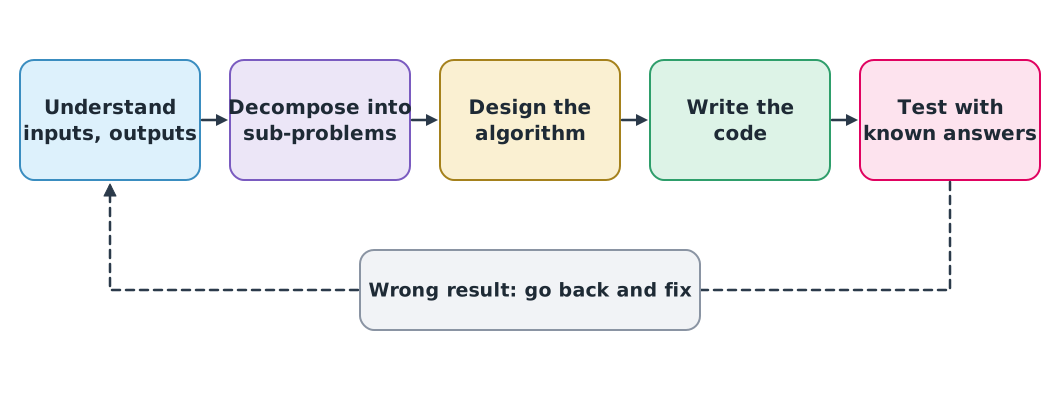
The step beginners skip most is testing with known answers. Before using a program on real data, always try it on an example you can calculate by hand, such as one from another course.
Setting up the environment
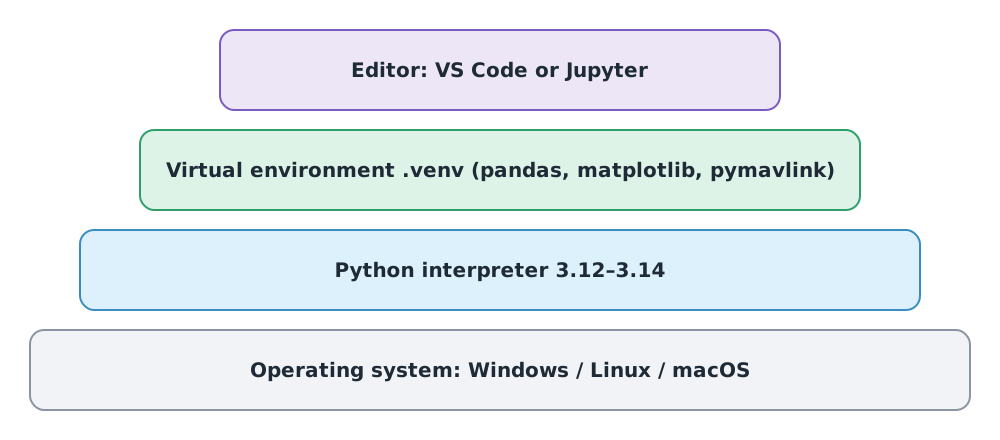
Choosing a Python version
On 26 September 2026 the supported Python versions are 3.10 to 3.14 (3.10 reaches end of life around October 2026), and 3.15 is scheduled for 1 October 2026. This course uses Python 3.12–3.14, because the libraries need at least 3.11 and pymavlink has no 3.15 build yet. Check your version with python --version.
Creating a virtual environment
A virtual environment is a folder that keeps each project’s libraries separate, like a personal toolbox for each job. If one project needs an old library version and another needs a new one, they do not clash. Download requirements.txt from the course download page and run, in your work folder:
python -m venv .venv
.venv\Scripts\Activate.ps1          # Windows PowerShell
# source .venv/bin/activate         # Linux or macOS
python -m pip install -r requirements.txt
Once activated, (.venv) appears before the prompt. Activate the venv every time you open a new session. Since Python 3.13, venv writes a .gitignore into the folder, so the environment is not accidentally committed to Git (module 5).
Recommended tools are VS Code for .py files and Jupyter Notebook for step-by-step experiments with plots (see the Jupyter knowledge unit in the drone knowledge hub).
Variables and data types
A variable is a name bound to a value, like a label stuck on a box. Python works out the type itself. The four most common types are:
aircraft = "RSU-QUAD-01"      # str: text
motor_count = 4               # int: whole number
battery_voltage = 22.2        # float: real number (decimal)
armed = False                 # bool: True or False

for value in (aircraft, motor_count, battery_voltage, armed):
    print(type(value).__name__, value)
str RSU-QUAD-01
int 4
float 22.2
bool FalseNames that state meaning and unit, such as battery_voltage or altitude_m, keep code readable months later and prevent unit mistakes.
Calculating and converting units
Python uses + - * / as usual; // is floor division, % the remainder and ** a power.
Example 1 Unit conversion and battery energy
Using the values from DRT 342 module 1: a 22.2 V, 8.0 Ah battery, 80% usable, 350 W average power, and a speed of 54 km/h.
speed_kmh = 54
speed_ms = speed_kmh / 3.6

voltage_v = 22.2
capacity_ah = 8.0
energy_wh = voltage_v * capacity_ah
usable_wh = 0.8 * energy_wh
power_w = 350
endurance_min = usable_wh / power_w * 60

print(f"speed: {speed_ms:.1f} m/s")
print(f"energy: {energy_wh:.1f} Wh, usable: {usable_wh:.1f} Wh")
print(f"endurance: {endurance_min:.1f} min")
speed: 15.0 m/s
energy: 177.6 Wh, usable: 142.1 Wh
endurance: 24.4 minThe results match the hand calculation in DRT 342, which is testing with known answers as in Figure 1.
An f-string starts with f and inserts values in braces {...}. :.1f means one decimal place. It makes results readable without changing the stored value.
Decimals that are not exactly equal
Computers store floats in binary, so a value such as 0.1 is stored only as the nearest representable number. The Python documentation stresses that this is not a bug in Python; it is the nature of binary floating point in every language.
Example 2 Adding 0.1 ten times
import math

total = 0.0
for _ in range(10):
    total += 0.1

print(total)
print(total == 1.0)
print(math.isclose(total, 1.0))
0.9999999999999999
False
TrueComparing floats with == is therefore risky. Use math.isclose(), which allows a small tolerance. This matters for sensor data, whose values are never exact.
Writing code others can read
PEP 8 is the Python style guide used worldwide. Follow these points from day one:
| Topic | PEP 8 guidance | Example |
|---|---|---|
| Indentation | 4 spaces per level | print(x) |
| Line length | At most 79 characters (a team may agree on up to 99) | |
| Variables and functions | Lower case with underscores | battery_voltage, distance_m() |
| Classes | CapWords | SimDrone |
| Constants | Upper case with underscores | EARTH_RADIUS_M |
Module lab
Lab: a mission calculator
- Install Python 3.12–3.14, create
.venvand install the libraries fromrequirements.txt. Screenshot the output ofpython --versionandpip list. - Write
mission_calc.py, storing voltage, capacity, usable fraction, average power and mission distance as variables, and print the available flight time and the time the mission needs. - Test the program against Example 1 so it gives 24.4 minutes before switching to your group’s drone.
- Open Jupyter Notebook, run Example 2, and explain the result in your own words in a text cell.
Common mistakes
Watch out
- Installing libraries directly on the system instead of in a venv, so projects clash
- Forgetting to activate the venv, then wondering why
import pandasfails - Comparing floats with
== - Variable names without units, such as
vorx1, causing km/h and m/s mix-ups - Using a Python version the libraries do not support yet, such as a pre-release
Summary
- Computational thinking means decomposing a problem, designing steps, coding, and testing with known answers
- Use Python 3.12–3.14 and keep each project’s libraries separate with venv
- The basic types are int, float, str and bool; f-strings format results
- Floats cannot store most decimals exactly; compare them with
math.isclose() - Name things according to PEP 8, with names that state meaning and unit
Check your understanding
- Why test a program with known answers before using it on real data?
- Which command creates a virtual environment named
.venv? - What does
type(4.0).__name__return? - How many m/s is 72 km/h?
- Under PEP 8, how should a constant for the Earth’s radius be named?
Answers
- To confirm the program calculates correctly first; if the result does not match the known value, you know to fix the program rather than doubt the real data
python -m venv .venvfloat- m/s
- Upper case with underscores, for example
EARTH_RADIUS_M
Key formulas
| km/h to m/s | |
| Battery energy |
Key references
- Wing, J. M. (2006). Computational thinking. Communications of the ACM, 49(3), 33–35. link
- Python Software Foundation. The Python tutorial (Python 3.14 documentation). link
- Python Software Foundation. Status of Python versions. Python Developer’s Guide. link
- Python Software Foundation. venv — Creation of virtual environments (Python 3.14 documentation). link
- Python Software Foundation. Floating-point arithmetic: Issues and limitations. In The Python tutorial (Python 3.14 documentation). link
- van Rossum, G., Warsaw, B., & Coghlan, A. (2001). PEP 8 – Style guide for Python code. link
- Downey, A. B. (2024). Think Python: How to think like a computer scientist (3rd ed.). O’Reilly. link
- Matthes, E. (2023). Python crash course (3rd ed.). No Starch Press.
Further reading
Study the assigned knowledge units in advance, review media and take the module quiz
In class / field
Lab or field practice from worksheets with a safety checklist
Learning evidence: Checked worksheets and quiz results